Icon of program: TypingClub

TypingClub for Windows

  • Free
  • 4.4
    304
  • 143.6K
  • Vvaries-with-device

Kristina Schulz

Updated last year

Improve typing proficiency with this tool

TypingClub is a free utility application designed to help users enhance their typing speed and accuracy. It teaches touch typing, allowing users to type without looking at the keyboard while using all fingers. Its structured design makes it easier for users to develop better typing habits over time.

Top Recommended Alternative
Step-by-step learning approach

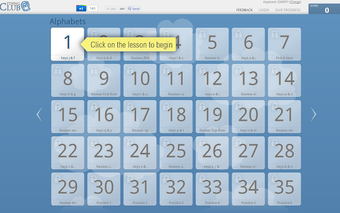
In TypingClub, each lesson has a specific objective, focusing on speed, accuracy, or the use of individual fingers. Some mini-games provide a fun way to reinforce skills while maintaining engagement. New users can take a placement test to assess their abilities and determine which lessons are best for them.

After each practice session, the application provides detailed performance results, including accuracy, duration, and words per minute. This tracking system helps users monitor their progress and identify areas for improvement. However, some users might find the lessons too short, expecting more extensive exercises to refine their skills.

Monitor your progress 

TypingClub provides an excellent platform for enhancing typing skills through engaging lessons and performance monitoring. While some might find the lessons brief, the program is still a valuable tool for individuals seeking to improve their typing abilities. It is suitable for learners at different skill levels.


Kristina Schulz

Kristina has professional experience in Europe, the United States, and Asia, specializing in communication and languages. She values adaptability in multicultural settings and brings this perspective to her writing. Her content reflects clarity, cross-cultural awareness, and practical expertise in connecting ideas through language.

  • Pros

    • Structured lessons with progressive difficulty
    • Mini-games add variety and engagement
    • Tracks accuracy, duration, and words per minute
  • Cons

    • Lessons might feel too short for in-depth practice
 0/1

App specs

  • License

    Free

  • Version

    varies-with-device

  • Latest update

  • Platform

    Windows

  • OS

    Windows 10

  • Language

    English

  • Downloads

    143.6K

    Last month's downloads

    • 1.9K
  • Developer

Program available in other languages


Icon of program: TypingClub

TypingClub for PC

  • Free
  • 4.4
    304
  • 143.6K
  • Vvaries-with-device

User reviews about TypingClub

Have you tried TypingClub? Be the first to leave your opinion!

Add review

You may also like

Alternatives to TypingClub

Explore Apps

Latest articles

Laws concerning the use of this software vary from country to country. We do not encourage or condone the use of this program if it is in violation of these laws.
Softonic

Is TypingClub safe?

100/100

Score result: Clean

This file passed a comprehensive security scan using VirusTotal technology. It is safe to download.

  • Virus free
  • Spyware free
  • Malware free
  • Verified by Security Partners

    VirusTotal logo

Scan Info

Last scan
Friday, December 22, 2023
Scan provider
VirusTotal

Softonic security commitment

TypingClub has been thoroughly scanned by our advanced security systems and verified by industry-leading partners. This file comes from the official developer and has passed all our security checks, showing no signs of viruses, malware, or spyware. For more information, visit our Security and Trust Center